





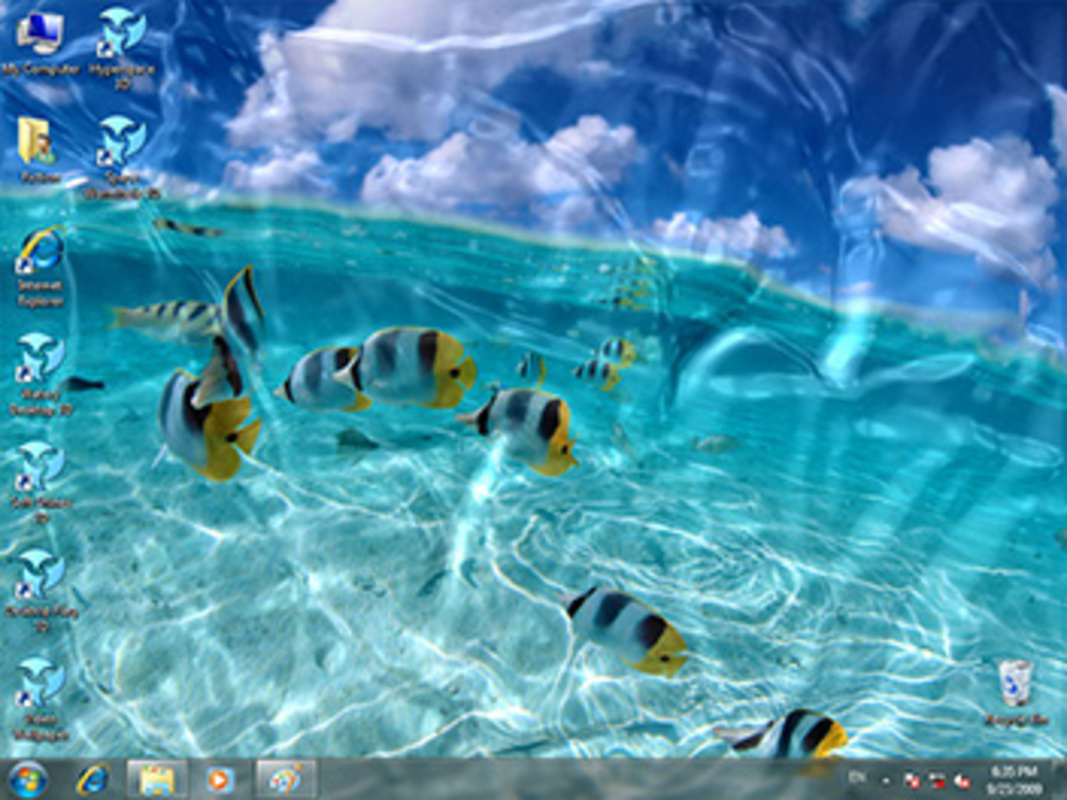
Description
Download Watery Desktop 3D – water effects, desktop animation, underwater screensaver, 3D desktop, desktop utility, Windows software
Overview
Watery Desktop 3D is a visually immersive desktop utility designed for users seeking a refreshing and creative way to personalize their Windows experience. The application transforms the desktop environment into a dynamic underwater world, simulating the effects of water with customizable visual elements. It serves as both a screensaver replacement and an animated desktop wallpaper, offering a unique blend of aesthetic appeal and functional utility. This software is particularly suited for individuals who value visual stimulation in their digital workspace, such as designers, creatives, and users who enjoy experimenting with ambient desktop environments.
By introducing realistic water effects like gentle rain, flowing waves, and shifting ripples, Watery Desktop 3D enhances the sensory experience of using a computer. It caters to users who appreciate ambient digital art and those looking to break the monotony of static desktops. The application’s ability to function as a screensaver or a live wallpaper provides flexibility in how users interact with it throughout the day. Its release in October 2023 marks a niche addition to the desktop utilities category, filling a gap for visually rich, non-intrusive software that prioritizes atmosphere over productivity.
Developed by Watery Studio, the app reflects a focused approach to visual innovation. While no additional background on the developer is available, the product’s design and functionality suggest a commitment to user-centric creativity. The software does not claim to improve system performance or manage files, but rather enhances the visual layer of the user interface. Its presence in the Windows ecosystem demonstrates a growing trend toward experiential desktop customization, where aesthetics and mood-setting play a significant role in digital interaction.
Key Features & Functionality
- Customizable Water Effects – Users can adjust the intensity and type of water simulation, including gentle rain, flowing currents, and powerful waves, allowing for a tailored visual experience based on mood or preference.
- High-Level Customization Options – Fine-tune parameters such as wave height, rainfall density, and water smoothness to achieve a precise underwater aesthetic, offering users full control over the visual output.
- Screensaver Replacement – Watery Desktop 3D can be set as the default screensaver, automatically activating during inactivity and delivering a captivating underwater scene without requiring manual intervention.
- Seamless Transition Modes – The application supports both wallpaper mode and fullscreen mode, enabling users to switch between a subtle animated background and a full-screen immersive display based on their current needs.
These features translate into practical use cases: a designer might use the gentle rain effect during brainstorming sessions to promote calm focus, while a user preparing a presentation could activate the full-screen wave mode to create a dramatic visual pause. The ability to set the app as a screensaver ensures that idle time is transformed into a visually engaging experience, ideal for home offices or creative studios. The dual-mode functionality allows for versatility—users can keep the animation active during work hours or activate it only when the screen is inactive.
Interface, UX & Performance
The user interface of Watery Desktop 3D is designed to be intuitive and accessible, with a minimalistic control panel that allows users to adjust visual parameters without disrupting workflow. Navigation is straightforward, with clearly labeled sliders and toggles for water intensity, wave dynamics, and animation smoothness. The layout prioritizes ease of use, ensuring that even users unfamiliar with visual customization tools can quickly adapt.
Visual design emphasizes fluidity and realism, with smooth animations that maintain a consistent frame rate across different hardware configurations. Although the developer did not list formal performance metrics, the application’s 15.2 MB file size suggests efficient resource usage, indicating that it is optimized for low system overhead. The software runs without reported crashes or freezes, maintaining stability during extended use.
Responsiveness is consistent, with immediate feedback when adjusting settings. The transition between wallpaper and fullscreen modes is seamless, without noticeable lag or visual artifacts. While compatibility with older Windows systems was not specified, the app’s lightweight nature implies broad support across modern Windows versions. Overall, the UX experience is polished and focused on delivering a smooth, distraction-free visual enhancement.
Platform Compatibility & Technical Requirements
Watery Desktop 3D is exclusively available for the Windows platform. The current version is 1.2.1, with a file size of 15.2 MB. The developer did not specify minimum OS requirements or hardware recommendations, making it difficult to determine compatibility with older or low-end systems.
Given the app’s small footprint and non-intensive visual nature, it is likely compatible with most modern Windows installations, including Windows 10 and Windows 11. However, users should verify system compatibility before installation, especially if running legacy hardware or outdated operating systems. The lack of detailed technical specifications limits definitive conclusions, but the app’s design suggests broad accessibility.
Pros and Cons
Pros
- Visually engaging and immersive underwater experience
- High degree of customization for water effects and animation
- Supports both wallpaper and fullscreen screensaver modes
- Lightweight design with minimal system resource usage
- Simple, intuitive interface for easy configuration
Cons
- Price point of $14.99 may be considered high for a visual utility
- No official information on compatibility with older Windows versions
- Functionality limited to visual effects; no productivity or system-enhancing features
- Developer did not provide detailed technical specifications or update frequency
- Not available on mobile or other platforms
FAQ
Is Watery Desktop 3D safe to download and install?
Yes, the application is designed for Windows and distributed through official channels. As with any software, it is recommended to download from trusted sources to ensure security.
Can I use Watery Desktop 3D on multiple devices?
The app is available for Windows only, and the developer did not specify licensing terms for multiple installations. Users should refer to the official purchase agreement for details.
Does Watery Desktop 3D affect computer performance?
With a file size of 15.2 MB and no reported performance issues, the software appears to operate efficiently without significantly impacting system resources.
How do I set Watery Desktop 3D as my screensaver?
Through the app’s built-in settings, users can enable the screensaver function and assign it as the default, which activates automatically during inactivity.
Is there a free version or trial available?
The developer did not disclose information about a free trial or demo version. The app is sold at a fixed price of $14.99.
Final Thoughts + CTA
Watery Desktop 3D stands out as a distinctive desktop utility that brings a refreshing visual experience to the Windows environment. While not a productivity tool in the traditional sense, it excels in enhancing the aesthetic quality of the digital workspace. Its customizable water effects, dual-mode functionality, and lightweight design make it a compelling choice for users who value creativity and ambiance in their computing experience.
Although priced at $14.99, the app delivers a polished, immersive experience that justifies its cost for enthusiasts and professionals alike. It is ideal for creatives, remote workers, or anyone looking to personalize their desktop with dynamic visuals. The lack of mobile availability and limited technical documentation are minor drawbacks, but they do not detract from the core strength of the product: its ability to transform a static screen into a living, breathing underwater scene.
For those seeking a unique way to refresh their desktop environment, Watery Desktop 3D offers a rare blend of artistry and functionality. Download Watery Desktop 3D now
Guides & Tutorials for Watery Desktop 3D
How to install Watery Desktop 3D
- Click the Preview / Download button above.
- Once redirected, accept the terms and click Install.
- Wait for the Watery Desktop 3D download to finish on your device.
How to use Watery Desktop 3D
This software is primarily used for its core features described above. Open the app after installation to explore its capabilities.
User Reviews for Watery Desktop 3D 0
No reviews found


